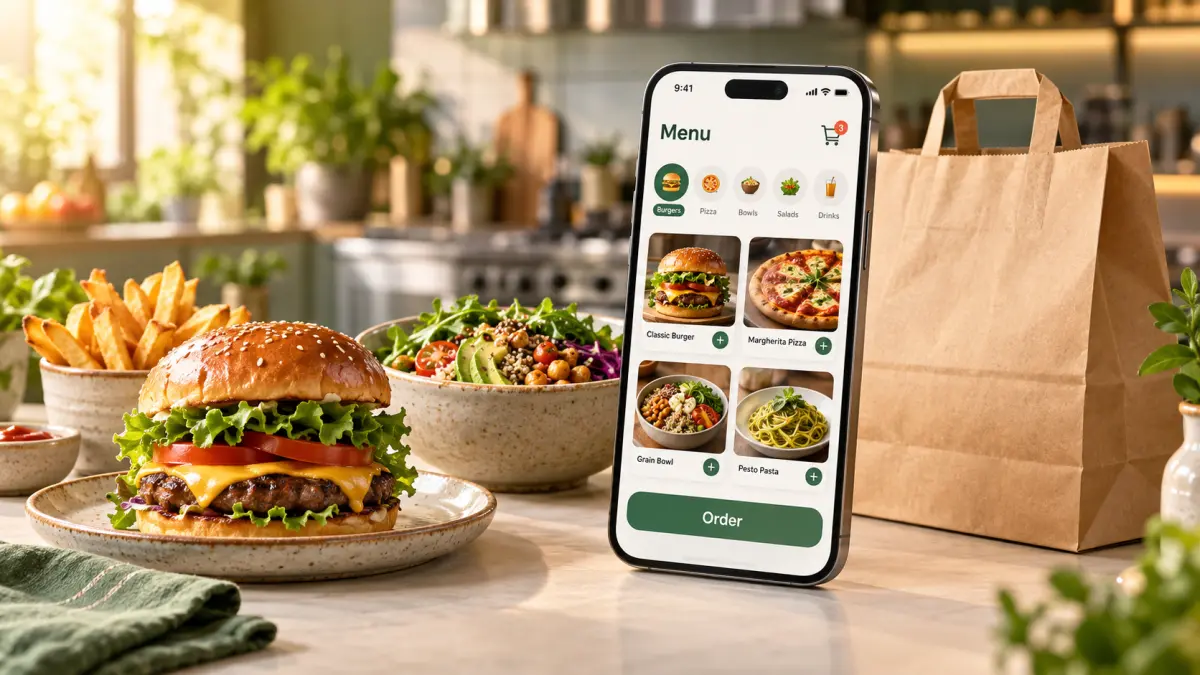
AI Overview
"An online food ordering system is software that lets customers browse a restaurant's menu, customize items, pay, and track their order from a phone or computer — through a QR code at the table, a branded website, or a delivery storefront — with every order routed directly to the kitchen display or POS. The key difference between systems is who owns the order. Delivery marketplaces like Uber Eats, DoorDash, Deliveroo, and Glovo charge 15–30% commission and keep the customer data; zero-commission platforms such as OCHI let restaurants keep 100% of revenue, own their customer relationships, and serve multilingual menus under their own name. The best systems combine QR table ordering, guest checkout, local payment methods, smart upsells, and POS integration, and can go live within 48 hours.
| Ordering model | Commission per order | Customer data | Branding | Monthly cost at 1,000 orders × $20 |
|---|---|---|---|---|
| Delivery marketplace (Uber Eats, DoorDash, Deliveroo, Glovo, Talabat) | 15–30% | Platform owns it | Theirs | $3,000–6,000 lost |
| Phone orders only | 0% | Nothing captured | None | ~5 min staff time per order, 12% error rate |
| Custom-built website or app | 0% | Yours | Yours | $800–2,500 hosting, maintenance, updates |
| Zero-commission platform (e.g. OCHI) | 0% | Yours, exportable | Yours (yourname.ochi.ma) | Flat monthly fee, $0 per order |
Table of Contents
Apizzeria owner in Lisbon opened her platform statement in August and found €2,700 gone from €9,000 in online sales. Nothing was stolen. That was the commission. Her online food ordering system was working exactly as designed — for the platform, not for her.
The same story plays out in Chicago, Manchester, Dubai, and Casablanca. Restaurants sign up for growth and end up renting their own customers back at 25% a month. The answer is not to abandon online ordering — diners worldwide now expect it. The answer is to understand what an online food ordering system actually is, which parts drive revenue, and which parts quietly drain it.
What is an online food ordering system?
An online food ordering system is software that lets customers browse your menu, customize items, pay, and receive order updates without calling or waiting for a server. Orders route straight to your kitchen display or POS. The critical distinction is where the order lives.
On a marketplace app, the customer belongs to the app. You receive a ticket and a commission deduction. On an owned system — a branded storefront like yourname.ochi.ma — the customer belongs to you: their phone number, order history, favourite dishes, and the trust that comes from ordering directly from your name.
Both are technically online food ordering systems. Only one builds an asset you keep.
Digital menu ROI
How much are paper menus costing you?
Saved per month
1.2K MAD
Saved per year
14K MAD
The four channels a modern system must cover
Restaurants that treat online ordering as just a website leave three doors closed. Diners order in four contexts, and the same menu, prices, and stock must flow through all of them.
QR table ordering. Customers scan a code at the table, browse photos, and order from their phone. No app download, no account. Restaurants across Europe, North America, and North Africa report average order values rising 15–22% because nobody feels rushed into skipping dessert.
Branded web storefront. Your own domain or subdomain that customers bookmark and return to. Restaurant searches peak on mobile after 9 PM; a static PDF menu at that hour hands the order to a marketplace.
Phone orders. They have not disappeared. A good system lets staff enter phone orders into the same flow, so the kitchen sees one queue instead of a tablet, a notepad, and a shouted ticket.
Delivery with zone control. Polygon delivery zones, not radius circles. A historic city centre and a suburban business park need different fees and minimums, and addresses in resort areas shift with the season.
What an online food ordering system really costs
Vendors quote setup fees. The money leaves through the monthly statement. Here is what a mid-size restaurant processing 1,000 orders at a $20 average pays under each model:
Monthly cost comparison — 1,000 orders at a $20 average
Cost line | Marketplace app | Custom-built site | Zero-commission platform |
|---|---|---|---|
Commission (25%) | $5,000 | $0 | $0 |
Marketing / promo contributions | $500–1,500 | $0 | $0 |
Hosting & maintenance | Included | $800–2,500 | $0 |
Payment processing | 2.9% + markup | 2.9% + $0.30 | 2.9% + $0.30 |
Multi-language menus | Basic auto-translation | Custom dev per language | Included |
Monthly total (excl. processing) | $5,500–6,500 | $800–2,500 | Flat platform fee |
Over a year, the marketplace column alone reaches $66,000–78,000 — enough to hire two full-time cooks or renovate a dining room. And commission rates tend to climb: a 15% introductory rate becomes 18% plus delivery fees by month six, then 25–30% with premium placement by year three.
Custom development avoids commission but replaces it with a different bill. Building means paying a backend developer, a frontend developer, a designer, and a project manager — typically $15,000–30,000 a month in salaries — for six to eight months to reach what a platform offers on day one. One restaurant group spent eight months and $25,000 on native apps; their competitor launched QR ordering in a week and captured 60% more orders in the first month.
The three features that actually move revenue
Forget 47-point feature lists. Three capabilities consistently change the numbers on a restaurant's bank statement.
Guest checkout
Forced registration loses roughly two-thirds of first-time orders. A tourist in Barcelona or a business traveller in Singapore will not create an account for one meal. Let them order first; offer an account afterwards with loyalty points and saved addresses. Restaurants using this sequence see around 45% voluntary sign-ups post-purchase — customers you now own.
Multilingual menus with real localization
A table in Montreal, Brussels, Dubai, or Agadir can seat three languages at once. True localization means right-to-left layouts for Arabic and Hebrew, correct accents and number formatting for French and German, and currency displayed the way locals expect. Auto-translation slapped over a single-language layout is not the same thing. Customers ordering in their comfort language complete more orders and spend more.
Smart upsells at the right moment
A flat digital menu can actually lower order value by removing the server's suggestion. The fix is timing: after a main is selected, show two or three relevant additions — a side salad and a drink with a pasta, fries with a burger, mint tea with a tagine. Well-placed prompts contribute 5–7% of the total AOV lift.
Local realities that global software gets wrong
Software designed in San Francisco assumes card payments, individual meals, and fixed business hours. Most of the world breaks those assumptions.
Payment habits differ. Germany and Japan still lean heavily on cash. The Gulf and North Africa run 60%+ cash on delivery. India lives on UPI, Brazil on Pix, Kenya on M-Pesa. Your system needs the local rails plus international cards for visitors. One restaurant that launched card-only saw 30% cart abandonment until it added cash.
Tables share. Across the Mediterranean, the Middle East, and much of Asia, four people order for the table and split the bill by social rules, not equal division. The interface needs an 'add to table' mindset, not four separate carts.
Peak seasons are not uniform. Ramadan iftar surges, Lunar New Year, Thanksgiving week, European August closures — the system must let you reschedule hours in one screen and handle 50 concurrent customers without slowing down.
Internet is not guaranteed. Beachfront and rural restaurants lose connectivity in bad weather. Offline-capable ordering that syncs when the connection returns, plus a 4G backup router, turns a Saturday-night disaster into a minor inconvenience.
Going live in 48 hours
Switching feels daunting until you see the actual timeline.
Day 1, morning: Upload your menu from a spreadsheet — items, prices, modifiers, photos. A 50-item menu takes 3–4 hours. Add translations in parallel; involve kitchen staff so item names read clearly on the kitchen display.
Day 1, afternoon: Configure payments (at least one local rail plus cards), draw delivery zones, set minimum orders. Your branded storefront goes live instantly.
Day 2: Train one champion per shift for 15–30 minutes. Print QR codes on weatherproof table stands at eye level. Run a soft launch with friends and family, fix friction, then announce on social media and update your Google Business profile.
Week 1: Read the data. Which items get viewed but not ordered? Those need better photos. Which pairings recur? Those become combos. Most restaurants reach full staff adoption within two weeks.
Five questions to ask before you sign
The answers reveal whether you are buying a tool or entering a trap.
What is the commission — zero, or 'low'? Service fee, platform fee, and processing above 3% are all commission by another name.
Can I export my full customer database today? Real ownership means a downloadable CSV with order history, not just emails.
Is the payment account mine? If you leave, your Stripe, Adyen, or local gateway setup should leave with you.
What happens when the internet drops? Orders should keep flowing offline and sync later.
How do I cancel? Monthly terms respect you. Multi-year locks with penalties tell you who benefits.
OCHI answers all five the same way: zero commission, full export anytime, your own payment accounts, offline-resilient architecture, and no long-term contract.
The choice in one sentence
An online food ordering system either builds your restaurant's digital asset or rents it back to you at 25% a month. Your customers are already ordering online; the only question is whose name they see when they do.
See what a branded, zero-commission storefront looks like for your restaurant at yourname.ochi.ma, and explore the full platform at ochi.ma/partners.
Frequently Asked Questions
What is an online food ordering system?
Software that lets customers browse a restaurant's menu, customize items, pay, and track their order online — via QR code, website, or phone entry — with orders routed directly to the kitchen or POS.
How much does an online food ordering system cost?
Marketplace apps charge 15–30% commission plus marketing fees, costing a 1,000-order restaurant $5,500 or more monthly. Custom builds run $800–2,500 monthly in hosting and maintenance after a six-figure development cost. Zero-commission platforms charge a flat monthly fee with $0 per order.
Do customers need to download an app?
No. Web-based QR and storefront ordering works instantly in the phone's browser. App-download requirements cause 70–80% of hungry customers to abandon the order.
Does an online ordering system work with cash and local payment methods?
A good one must. Cash on delivery, UPI, Pix, M-Pesa, iDEAL, and local card schemes matter more in most markets than Apple Pay. Missing one option costs orders.
How long does implementation take?
Platform-based systems go live within 48 hours: menu upload and payment setup on day one, staff training and soft launch on day two. Custom development takes six to eight months.
Frequently Asked Questions
What is an online food ordering system?
Software that lets customers browse a restaurant's menu, customize items, pay, and track their order online — via QR code, branded website, or phone entry — with every order routed directly to the kitchen display or POS.
How much does an online food ordering system cost?
Marketplace apps charge 15–30% commission plus marketing fees, costing a 1,000-order restaurant $5,500 or more monthly. Custom builds run $800–2,500 monthly in hosting and maintenance after a six-figure development cost. Zero-commission platforms charge a flat monthly fee with $0 per order.
What is the difference between a marketplace app and an owned ordering system?
On a marketplace, the customer belongs to the app: you receive a ticket and a commission deduction. On an owned system with a branded storefront, you keep the customer's contact details, order history, and loyalty — an asset that stays with your restaurant.
Do customers need to download an app?
No. Web-based QR and storefront ordering works instantly in the phone's browser. Forcing an app download causes 70–80% of hungry customers to abandon the order.
Does an online ordering system increase average order value?
Yes. Restaurants using QR table ordering and branded storefronts report 15–22% higher average orders. Customers browse at their own pace, see photos of appetizers and desserts, and respond to well-timed upsell prompts without feeling rushed.
Does an online ordering system work with cash and local payment methods?
A good one must. Cash on delivery, UPI, Pix, M-Pesa, iDEAL, and local card schemes matter more in most markets than Apple Pay. One restaurant that launched card-only saw 30% cart abandonment until it added cash.
Can an online food ordering system integrate with my existing POS?
Modern platforms sync orders from every channel — QR, web, phone, delivery — into one kitchen queue and one inventory. Look for native POS integration or a webhook API so nothing has to be re-typed by staff.
How long does implementation take?
Platform-based systems go live within 48 hours: menu upload and payment setup on day one, staff training and soft launch on day two. Custom development takes six to eight months.
What happens if the internet goes down during service?
Offline-capable systems keep taking orders locally and sync when the connection returns. Pair this with a 4G backup router and a printed fallback menu, and a Saturday-night outage becomes a minor inconvenience instead of a lost night of revenue.
What should I check before signing with an ordering platform?
Ask five things: Is commission truly zero? Can I export my full customer database today? Is the payment account mine? Does ordering keep working offline? Can I cancel monthly without penalties? The answers reveal whether you are buying a tool or entering a trap.
Restaurant owners · Weekly
The guide to running a restaurant in 2026.
One article per week. No commission advice. Just honest operational insight for Moroccan restaurants.

Blog Manager
Comments
No comments yet. Be the first to share your thoughts.